
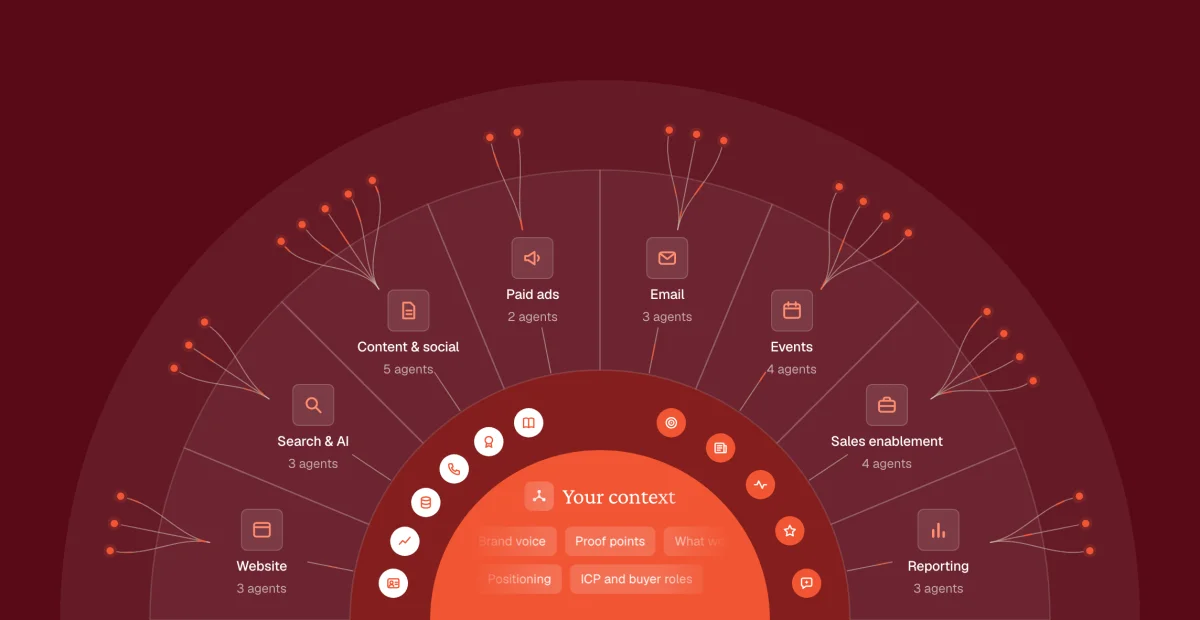
IEvery era gave marketing a new machine
Right now, someone on your team is running a machine.
Moving a webinar list from one tool to another. Explaining the product to ChatGPT, again.
None of that work existed before the machine did.
It's been that way for sixty years. Every new machine needed someone to run it.
Agents are the sixth machine. Let's start with the first.
Era 1: Mail, print and trade shows (1960s to early 1990s)
Marketing was a letter in a bottle. You threw it out and waited to see what washed back.
Getting the bottle out the door took people. Machines copied and addressed. People did everything else: the list, the letter, the booth, the follow-up.
Four machines carried the load:
- The Addressograph stamped the addresses, so nobody wrote them by hand.
- The ZIP code let a machine sort the mail.
- The toll-free 800 number made replying free.
- The “bingo card” turned a magazine reader into a lead. It was B2B's first lead generation system.
Readers circled numbers for the advertisers they liked. The magazine forwarded the cards. The brochures arrived one to two months later, at best.
The work wasn't the slow part. The feedback was.
Send, wait weeks, count the replies, change the letter. With a loop that slow, a team learned a few times a year.
That's why one winning letter could run for decades. The Wall Street Journal mailed Martin Conroy's “Two Young Men” letter for 28 years. Testing a new one was slow and expensive, so a winner was worth keeping.
Every era since has tried to shorten that loop.
Era 2: The web (1994 to mid 2000s)
Era 1 was a letter in a bottle. Era 2 was a shop window with a counter on the door.
For the first time, you could see who walked past. Not who they were.
And every number on that counter needed someone to read it.
Machines served the ads and counted the clicks. People did everything else: the site, the copy, the reports, and every lead copied into the sales system by hand.
- The banner ad made an ad something you could click.
- Search ads let you buy the moment someone was looking.
- Email made a letter free to send.
- Free analytics put the counter on every website.
The counter had bad news. The first banner ad, in 1994, got 44% of people to click. By 2000, the average was 0.2%.
For the first time, you could watch an ad stop working within days. Someone had to notice. Someone had to change it.
The web didn't make marketing easier. It made marketing measurable.
And once everything could be counted, the board started asking for the count.
So who was going to act on all of it?
Era 3: Marketing automation (1999 to 2013)
Era 2 was a shop window. Era 3 was a conveyor belt.
A lead downloaded a white paper, and the first email reached them before they'd finished reading it.
And every conveyor belt needed someone to run it.
Machines sent the emails, scored the leads and passed them to sales. People did everything else: wrote the scoring rules, built the nurture emails, cleaned the data, and argued with sales about what counted as a lead.
- Eloqua (1999) sent the email nobody had to press send on.
- Marketo and HubSpot brought automation to teams without an IT department.
- The lead score said who was ready for a call.
- The CRM sync put the lead in the sales system without anyone copying it over.
Then someone timed the handoff. A 2011 Harvard Business Review study sent a web lead to 2,241 US companies. The average reply took 42 hours. Firms that called within an hour were nearly 7x as likely to qualify the lead.
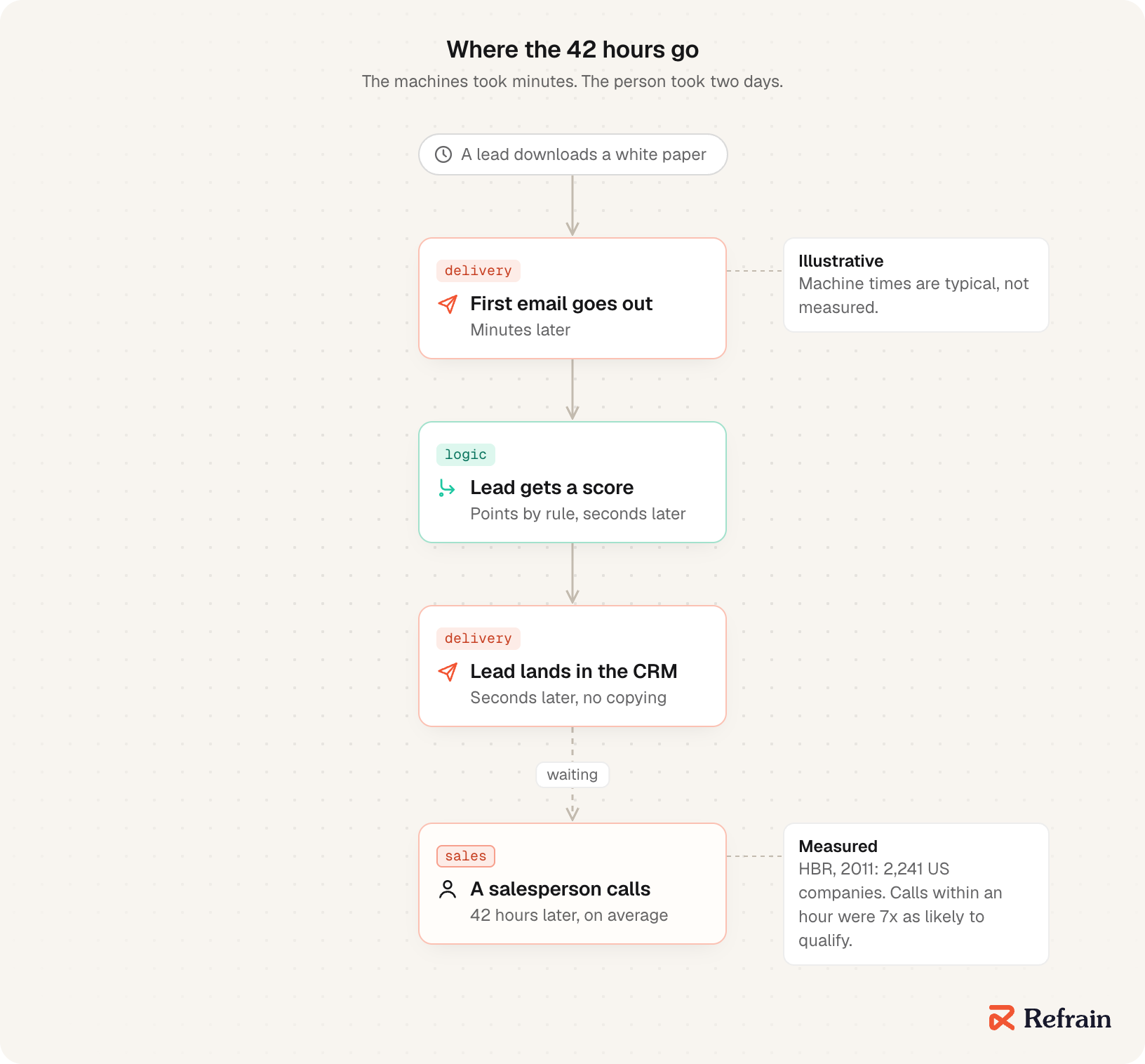
The machine worked in minutes. People still took two days.
Automation didn't shrink the marketing team. It gave it a new job: running the machine. That job got a name. Marketing ops.
The machine was fast. The handoff was still human. So the answer seemed obvious: buy a tool for that too.
Era 4: Martech sprawl (2011 to 2022)
Era 3 was a conveyor belt. Era 4 was a drawer full of remote controls.
Every tool had a live dashboard. One answer across all of them took a spreadsheet and a Friday afternoon.
For the first time, the wait got longer. Faster inside each tool. Slower across them.
Machines each did one task. People did everything else: moved the data between them, fixed the fields that didn't match, and built the report no single tool could.
Scott Brinker's first martech map, in 2011, had 150 tools. The 2025 one has 15,384.
- The CRM held the contacts.
- The automation platform sent the emails.
- The webinar tool collected the sign-ups.
- The social scheduler posted the posts.
- The intent tool guessed who was shopping.
Gartner surveyed 405 marketing leaders in 2023. They used 33% of what their martech stack could do. The same year, technology took 25.4% of their marketing budget.
A quarter of the budget, for tools used a third of the way.
One company, Zapier, was built entirely on connecting the tools to each other. It started with 25 apps in 2011. Today it connects more than 10,000.
More tools didn't mean less work. They meant a new kind of work: moving things between tools. The machines took the tasks, and people became the glue.
Then, on November 30, 2022, a tool arrived that could do something none of the others could.
It could write.
Era 5: Chat AI (November 2022 onward)
Era 4 was a drawer full of remote controls. Era 5 was a brilliant intern with no memory.
A first draft took thirty seconds. Checking it, fixing it and pasting it into five tools took the rest of the afternoon.
And every draft needed someone to carry it the last mile.
Machines wrote the first draft. People did everything else: wrote the prompt, explained the context again every time, checked the facts, and pasted the result where it belonged.
- ChatGPT wrote anything you asked for, and reached about 100M monthly users in two months.
- AI copywriting tools turned prompts into ad copy and blog posts.
- The AI button appeared inside every tool you already paid for.
- The company login put the intern on every desk.
The intern made new work, too. In a 2025 Stanford and BetterUp study, 40% of 1,150 US desk workers said they'd received “workslop” in the past month: AI work that looks finished but isn't. Each one took nearly two hours to clean up.
The machine saved minutes. The person paid hours.
Chat AI didn't take a job. It took a step. The person still owned the job, now with one more thing to brief.
So what if the machine did the whole job? Remembered the context, used the tools, and came back only when it needed a yes?
Era 6: Agents that do whole jobs (2026)
Era 5 was a brilliant intern with no memory. Era 6 is the night shift.
The loop doesn't wait for anyone now. It runs overnight, and you read the results with your coffee.
And every night shift needs someone to set the rules, and someone to sign the morning report.
Machines do the whole job: gather, draft, check, file it in the right tool, and learn from the last correction. People do everything else. And everything else is small now:
- Decide what the job is.
- Keep the facts true.
- Say yes or no.
The platforms ship this now:
- OpenAI's dots work around the clock, on their own computer, inside Slack or Teams.
- xAI's Grok Bot runs a team of bots in one thread, passing work to each other.
- Anthropic's Claude Tag joins your Slack, where anyone can tag it with a task and watch it work in the thread.
For sixty years, every machine took a task and left people the rest. This one takes the job, and leaves people the judgment.
The machines got better. The budget didn't. Gartner found marketing budgets at large companies flat at 7.7% of revenue for the second year running.
So every CMO has the same question: how do you get more done with the same team and the same money?
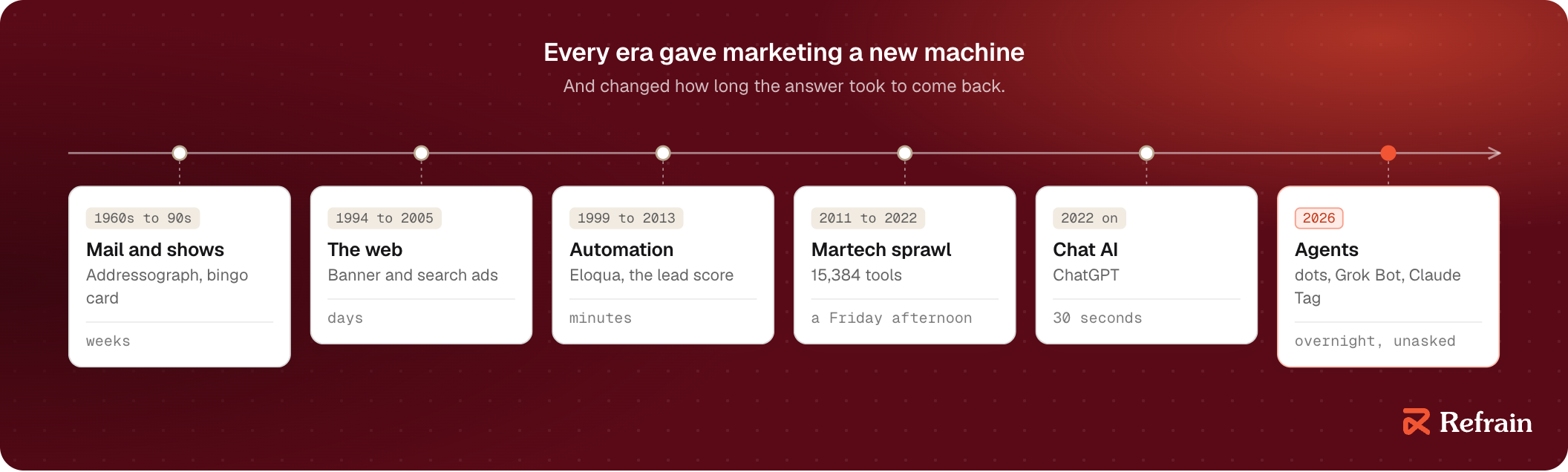
You probably have a machine from every era.
A conference budget. Paid search. HubSpot. Twenty-odd tools. A ChatGPT login for everyone.
Your team still spends its week on everything else.
This guide is about shrinking “everything else” to the part only people should do.
IIA login isn't a system
Every quarter, the same question rolls down the chain.
The board asks the CEO: “How is marketing performing?”
The CEO asks the CMO.
The CMO has nobody to pass it to.
Joe Chernov, Pendo's CMO, calls it a chain of pain.
In the 100+ CMO interviews I listened to, this came up again and again: a board, CEO or CFO asking marketing to prove what it produces.
And the proof has to come from a team that isn't growing.
“Even if we have the budget, we don't have the people to implement the tools.”Jessica Gilmartin, former CMO and CRO at Calendly
More proof. More work. Same people.
Everyone got a login
In 2023, most CMOs reached for the same answer: give everyone an AI login.
Monica Ho, CMO at SOCi, did it better than most.
ChatGPT had just arrived. At her team's planning offsite, she told them: “We're going to hit AI hard.”
The recipe:
- An AI trainer.
- AI guidelines.
- Logins for everyone.
- “Go figure it out.”
Then she waited.
“Nothing really changed,” she said later. Nobody was experimenting. The copy wasn't better. The campaigns weren't better.
So she tried again. The people on her team who loved AI became AI specialists, leading trainings and finding use cases for everyone else.
“Honestly, both of those ideas flopped for us.”Monica Ho, CMO at SOCi
Not because her team was lazy. Because, in her words, “everybody's got their day job.”
The login added a tool to the week. It didn't take anything off it.
So why did a good tool change nothing?
Redesign the factory
Factories ran into the same problem 140 years ago.
When electricity arrived, most factory owners did the obvious thing. They pulled out the big steam engine in the middle of the floor and put one big electric motor in its place.
Same shafts. Same belts. Same layout.
Productivity barely moved. Edison's light bulb was patented in 1880. Twenty years later, electric motors drove less than 5% of factory machinery. It took until the 1920s to pass half.
The gains came when owners stopped swapping the engine and redesigned the factory: a small motor on every machine, and a floor laid out around how the work actually flowed.
A login is a motor bolted into the old factory.
Same week. Same handoffs. Same people. Plus a chat window.
Monica's team wasn't lazy. The tool wasn't weak. Nobody redesigned the factory.
So what does the redesign look like in marketing?
Monica redesigned hers. Not by choice.
By the end of 2024, the market was tight and efficiency was the only word in the room. Her team made a hard call: some roles wouldn't be backfilled.
“Now what?” she asked. “How are we going to figure this out?”
People were frustrated. Everything had changed at once.
Take one of those roles. SOCi used to have an industry specialist for financial services. Every line of copy spoke to that buyer.
Now a GPT had to do it.
“It's not just going to work. You have to train the GPT. You've got to set it up the correct way… and you've got to fine tune it along the way.”Monica Ho, CMO at SOCi
This time, nobody got a login and a pep talk. They set one tool up for one job.
Within a month or two, the team was back where it had been. A year on, she says they've seen “a lot of efficiency.”
She calls it “a finite investment.” Set it up once, get the team using it, and the work gets easier.
She isn't alone. Many of the CMOs I listened to built an AI tool for one standing job.
- Trinity Nguyen at UserGems asks each team lead which part of their day they hate most. Then that lead builds a GPT to do it, and owns it.
- Kate Johnson at Dscout stopped handing sales battle cards. She gives them “battle gems.”
- Tom Wentworth at incident.io wants one shared knowledge base for the whole team, with agents that act on it.
Different companies. Same move.
The fix wasn't more AI. It was a system: one job, set up once, trained on what the company knows, with a person approving.
A bot for everyone isn't it either
Now the platforms are making this easy.
OpenAI, xAI and Anthropic all ship always-on agents. Anyone on your team can have one by tomorrow morning. It runs on its own computer, remembers what they like, and works while they sleep.
It's the login problem again, just bigger. A bot for each person is still a motor bolted into the old factory.
The team plans help. Claude and ChatGPT both let a team share a project: the same files, the same instructions.
But a shared folder isn't shared truth.
- Last year's deck sits next to this year's.
- Nobody owns a fact.
- Nothing says which claims legal approved last month.
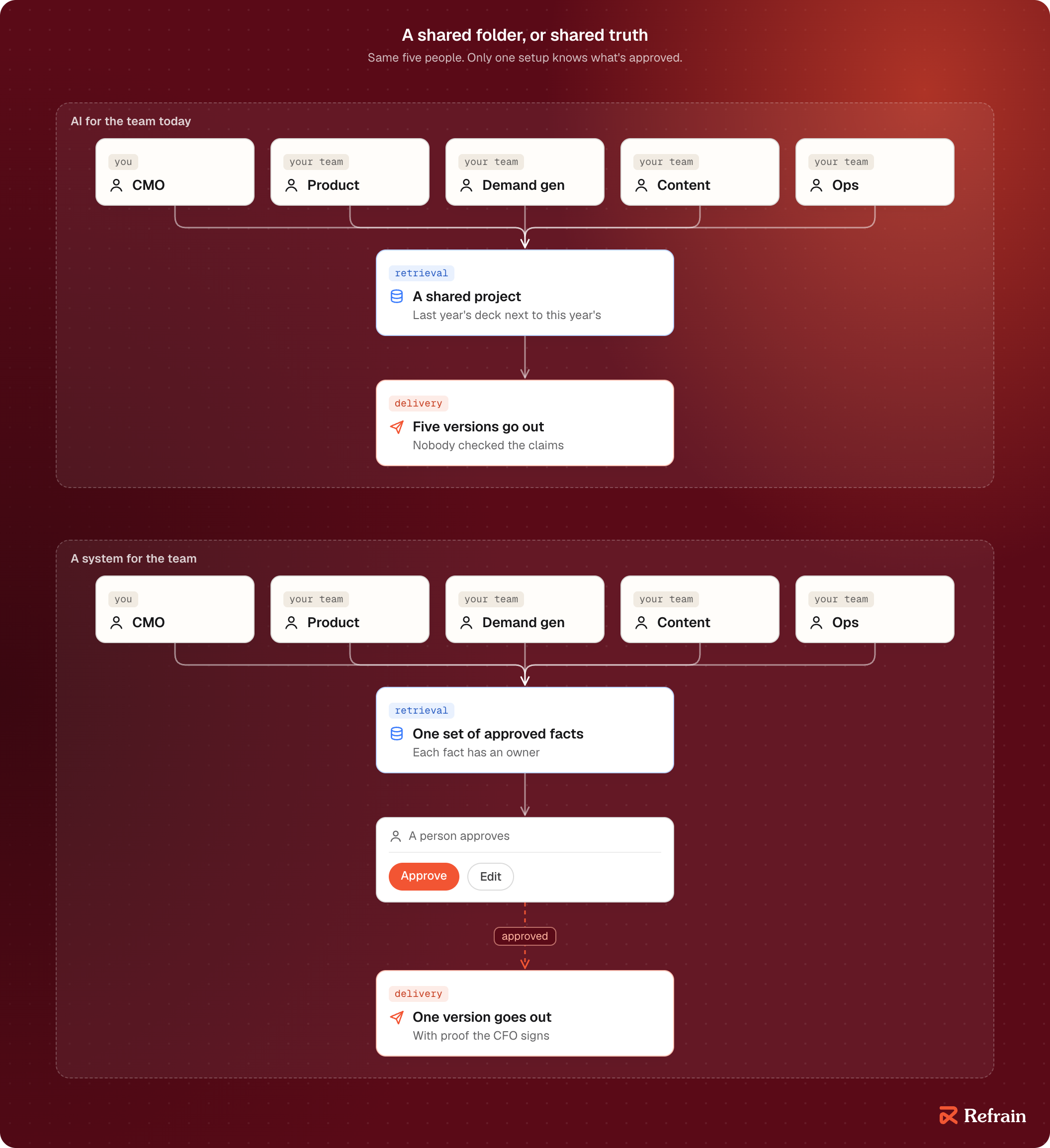
A team needs what no bot ships:
- One shared set of approved facts.
- Rules for what can go out.
- A person who approves.
- Proof the CFO will sign.
That's the factory. The bots are just the motors.
Next quarter, the question will roll down the chain again. This time, you need a better answer than a login.
The job already has a few names. Most of them mean something else.
IIIWhat this job is called
On Monday, a recruiter offers you a GTM engineer. On Wednesday, a vendor promises agentic marketing: set the goal, and the agents do the rest. On Friday, your ops lead asks, quietly, whether this is just their job with a new title.
Three pitches. Three different jobs.
Add the two you already pay for, marketing ops and marketing automation.
Then add the newest, marketing engineering.
That's five names for what sounds like the same work.
It isn't the same work. There's a quick way to tell them apart. Hold each one up against what a team needs, from the last chapter:
- Shared facts everyone trusts.
- Rules for what goes out.
- A person who approves.
- Proof the CFO will sign.
Start with the recruiter's pitch.
GTM engineering: a good hire for a different team
GTM engineering is the name you've most likely heard. People search for it six times as often as marketing engineering.
Clay coined it in 2023. In Clay's words: “GTM engineers build revenue engines using AI and automation.”
It's a real job, and a good one. But look at what it's built for.
We read 300+ job posts for both roles. Clay's tool shows up in half of the GTM engineering posts, and in 6% of the marketing engineering posts. Outbound: 39% against 2%. Content: 20% against 58%.
GTM engineers usually report to revenue operations. They build the pipe that carries leads to sales: finding accounts, filling in contact details, routing leads, running email sequences.

Now hold it up against the four tests.
- Shared facts? About accounts and contacts.
- Rules for what goes out? For the sales pipeline.
- A person who approves? Sometimes.
- Proof? Pipeline.
Your content, your product marketing and your events never come up.
The recruiter is offering a good hire. For a different team.
Agentic marketing: the person is gone
Then there's Wednesday's vendor.
Agentic marketing promises the opposite of a login. You don't do the work with AI. You hand AI the goal.
The common definition: “using autonomous AI agents to plan, execute, and optimize marketing campaigns based on goals.”
Set a target. The agents pick the channels, write the copy, launch, and adjust on their own.
It sounds like the system from the last chapter. Hold it up against the four tests.
- Shared facts? Whatever the agents find.
- Rules for what goes out? Set once, at the start.
- A person who approves? No. That's the point.
- Proof? Campaign results.
That third answer ends the conversation. One wrong claim in front of your biggest prospect costs more than every hour the agents saved.
Agentic marketing removes the person. Marketing engineering designs where the person stands.
Marketing ops and automation: keep it running
Which leaves Friday's question.
Your ops lead isn't wrong to ask. Marketing ops and marketing automation are the closest relatives of this job. They're also the two your team already runs.
Marketing automation is the machine from chapter I. It runs rules a person wrote: if someone fills in this form, send this email. It does exactly what it's told, and nothing else.
Marketing ops is the job that machine created. Clean data. Working integrations. Rules that fire when they should.
Profound's course puts it well: for ops, “the success metric there is silence.” If nothing breaks, they've done their job.
Hold them up against the four tests.
- Shared facts? Clean data, yes.
- Rules for what goes out? Yes, for the tools.
- A person who approves? Only when the rule gets written.
- Proof? Uptime and data quality.
Strong foundations. But nobody is asked to build what doesn't exist yet.
Profound draws the line in one sentence: “Marketing Ops keeps the infrastructure running. Marketing Engineering uses that infrastructure to invent new ways of marketing.”
So the answer to your ops lead is no, this isn't their job with a new title.
But they're closer to it than anyone. Profound says ops people have “the shortest distance to travel.”
Marketing engineering: a system for the whole team
So what is marketing engineering?
Nick Lafferty didn't have a title for what he did at Profound, so he wrote himself one.
“A Marketing Engineer is part-builder, part-marketer,” he wrote. “They sit inside a marketing team and build the AI agents, automations, and data infrastructure that let everyone else do their highest-leverage work.”
His shorter version: “A Marketing Engineer doesn't do the marketing. They build the machine that does.”
The name spread fast. Google's VP of Consumer and AI Marketing, Marvin Chow, called marketing engineers “the hire of 2026.”
But the best proof didn't come with a title at all.
Until the end of 2025, Matt Swulinski ran growth at Wispr Flow on his own. Every ad, every experiment, every landing page, on a budget of up to $5 million a month.
So he built himself a system. “One by one, day by day, I improved the system,” he said. “I entirely built it by myself.”
Then the team grew around him. In January, Wispr started hiring: a media buyer, a creative strategist, someone for influencer partnerships. By June, marketing was just under 20 people, across design, product marketing, influencers and country leads.
He did what a login never does. He handed his system to the team. “I've turned my personal OS into a team OS,” he told Profound's podcast.
Two months in, about half the team was using it.

A personal OS is a login. A team OS is a system.
Hold it up against the four tests.
- Shared facts? One set, owned by the team.
- Rules for what goes out? Written into the system.
- A person who approves? Built in.
- Proof? Hours back, what shipped, what it cost.
It's the only name that passes all four.

The name matters less than the job. When a recruiter, a vendor or your own team uses any of these five words, ask the four questions.
Now the harder question: who on your team owns which part of it?
Start with the team you already have.
IVThe team you already have
Every B2B marketing team does the same five jobs, whatever its size.
Tell the market what the product is.
Fill the pipeline.
Make the things people read.
Show up where buyers gather.
Keep the machine underneath running: the CRM, the data, the reports.
A team of five does all five. So does a team of forty.
Size doesn't change the jobs. It changes how many hats each person wears.
So which hats matter most? Look at what companies pay for.
What companies actually hire for
Job posts are the most honest org chart there is. They show what a company will pay to get done this quarter.
We read the open marketing job posts at 250+ US B2B software companies with 51 to 500 people, and noted what kind of work each one was hiring for.
- Product marketing: 42% of companies
- Field marketing and events: 27%
- Analytics and reporting: 24%
- Marketing ops: 20%
- Paid, content and department planning: 19% each
Read the top line again.
Not content. Not demand gen.
Product marketing. The person who explains the product: who it's for, why it wins, and which customer proved it.
Now look at number three.
Analytics and reporting. A quarter of these companies are hiring someone whose whole job is to show what marketing produced.
That's the chain of pain from chapter II, written up as a job post.
The list shifts as companies grow, too. Events climb from 18% of companies at 11 to 50 people to 37% at 501 to 1,000. Content drops to 11%.
Bigger companies hire for more rooms and fewer words.
Three shapes of the same team
There's no standard org chart. But most teams pass through three shapes. Think of them as sketches, not survey numbers.
At about 5, everyone is a team of one.
The CMO builds the board deck. Product marketing writes the competitor briefs and chases customers for quotes.
Demand gen runs the website too. And somebody owns the CRM and the conferences, because nobody else will.
At about 15, the hats turn into people.
Product marketing gets a second seat. Content splits from comms.
Ops and events get their own. A director appears between the CMO and the team.
Now work moves between people. Every handoff is a place where it waits.
At about 40, each seat grows into a team.
Product marketing gets a lead for each product line. Demand gen splits into paid, lifecycle and account-based marketing.
Analytics stops being a spreadsheet.
Now work moves between teams. The handoffs get their own meetings.
Here's what nobody draws on the chart. The repeat work doesn't shrink as the team grows.
It moves.
At five, it lives in everyone's evenings. At forty, it lives in the gaps: the brief nobody updated, the lead nobody called, the number two teams count differently.

A team of five
Take the first shape. Five people, and a company that wants more from them every quarter.
The board wants pipeline tied back to marketing. The CFO wants to know why the events budget keeps growing.
And there's no plan to hire.

Look at the line under each role.
Board slides. Competitor briefs. Leads nobody called. One webinar cut into ten posts. A kit for every conference.
None of it is the job. All of it is the week.
So every role on that chart has two halves.
The part you hired them for.
And the part they do because nobody else will.
The second half is what you hand off.
VWhat you hand off, and what you keep
Tell me if this sounds familiar.
It's Tuesday afternoon. You're pasting numbers from four tools into a board slide.
Your product marketer is rewriting the competitor brief for the third time this quarter.
Your ops lead is fixing the same CRM field they fixed last month.
So which half do you hand off?
In the 100+ CMO interviews I listened to, most draw a line between machine work and human work.
A few put a number on it. 50 to 55%. 70 to 80%. 95%.
None of them drew the line through their own week.
So let's draw it. Five roles, the team of five from the last chapter, one line through each.
The line
The line is the same in every role.
You hand off work that comes back. Every morning. Every Friday. Every deal.
Work that starts from something that already exists: a call recording, a CRM field, last month's numbers.
Work that ends in a draft.
You keep the rest. Choosing between options. Putting your name on something. Being the person someone trusts.
One rule holds across all five: the AI drafts, a person approves.
That check isn't new. In every role we studied, someone already reviews the work before it goes out.
The AI just gets them a better first draft, much faster.
The CMO: the board deck
Once a month, the numbers come out of four tools and go into three decks.
Three spreadsheets, open with your team, every month.
The spreadsheets aren't the worst part. The meeting is. You walk into the staff meeting with different numbers than the sales leader.
Hand off: pull every number from one source that sales uses too. Compare it to the quarter's goals. Flag what moved. Draft a version for the team, the executives and the board.
Keep: make sure your numbers match the sales leader's. Pick the story.
Nothing reaches the board unread.
If your deals take months to close, the story needs early signals. So the draft tracks accounts moving, not just deals closing.
Product marketing: the competitor brief and the customer's words
Product marketing runs on two kinds of listening.
Listening to customers: calls, interviews, support tickets. Every interview is an hour where you have to be fully on.
Listening to competitors: what they launched, what they claim, and what your reps need to say back before the next big deal.
Hand off: read every new call transcript and pull out the lines customers repeat. Send a competitor digest every Friday, with suggested edits to the battle cards.
Keep: check every quote against its source. Approve every card edit before a rep sees it.
And the positioning. Who the product is for, and why it wins. That never leaves your desk.
Demand gen: the morning check and the leads nobody called
Every morning starts the same way. Open the ad accounts. Check the spend. Decide what dies.
Then the leads. Marketing hands them to sales, and some of them sit.
War rooms don't fix it. Dashboards don't fix it. Keeping sales focused is a big ask.
Hand off: a keep, kill or hold list every morning, with a reason on every line. A list of leads past the agreed time, with the owner's name next to each.
Keep: every pause, and every budget change.
Badly set rules cause chaos. So the AI recommends. It never touches the ad account.
Content and comms: one webinar, ten posts
The webinar ends at noon.
The next two days go to cutting it into clips, posts, emails and a newsletter item.
Why bother? Because nobody can make net new content for every audience, every day.
Hand off: the first cut of every piece, in your voice, checked against your approved facts. A draft post to share each one.
Keep: the edit. And the send.
Every pitch to a journalist still comes from a person.
Marketing ops and events: the CRM and the conference kit
Nobody notices ops until something breaks.
Duplicate records. A field filled in four different ways. A lead matched to the wrong account.
Hours every week go to working out what belongs where.
Then a conference ends, and a stack of badge scans and phone notes has to become clean CRM records. It's so cumbersome that it rarely happens.
Rarely. After an event you paid for.
Hand off: a daily check that lists what's broken and suggests the fix. Every event's leads, turned into records ready to upload.
Keep: approve the upload. Agree with sales who gets invited and who follows up.

Look across the five.
What you hand off always has the same shape. Gather. Compare. Draft.
What you keep does too. Decide. Approve. Answer for it.
So will AI replace your team?
No. It replaces the Tuesday afternoon.
For a team of five, that's five jobs to hand off. One per person, each with an owner who approves the work.
But five jobs aren't a system yet.
That's the next part: the system in one picture.
VIThe system in one picture
Five jobs. Five sets of facts. Five versions of the truth.
That's what you get when every job keeps its own notes.
Most teams reach for the same fix: a better prompt. Or a better model.
It's the weakest lever you have.
Change the structure, not the parts
Donella Meadows co-wrote The Limits to Growth in 1972 and spent her career studying how systems behave. Her book Thinking in Systems comes down to one idea.
A system's behavior comes from its structure.
Swap the people or the tools, and the same structure gives you the same problems.
She ranked the places you can push on a system, from weakest to strongest. There are twelve.

At the bottom: the numbers and the settings. In your world, that's the prompt and the model.
Near the top:
- Who sees what happened.
- The rules.
- The goal.
Switching from ChatGPT to Claude is a change at the bottom of her list. Making sure a person sees every draft before it ships is near the top.
So before you write a prompt, draw the system.
Seven pieces, three jobs
Seven pieces, doing three jobs.
Two of them are where people come in.
The front door is where your team asks for work, in Slack or Teams.
The approver says yes before anything is used.
Four of them do the work.
The plugin packages the skills for one team.
Skills are one job, written down once.
Scripts search and count, and cost nothing to run.
The AI reads, judges and writes.
And one of them remembers.
The shared brain holds what your company knows: data, buyers, positioning, voice, proof and every past run. Each piece has an owner.
Seven pieces, and only one of them is the AI.
The other six decide what it hears, what it reads, and who checks it before anyone else sees the work.

One job, end to end
Watch one job move through it.
It's Tuesday. Your biggest deal of the quarter closes on Thursday, and the buyer is also talking to your top competitor.
- Product marketing types in Slack: “Competitor brief for Thursday's deal.”
- The plugin picks the competitor-brief skill.
- Scripts pull the competitor's site changes since the last brief, the last three sales calls that named them, and the claims you're allowed to make. That costs nothing.
- The AI reads only that pack and drafts the brief. Every claim has a source.
- The draft comes back in the same Slack thread.
- Product marketing approves it and corrects one claim: the competitor dropped a feature last month.
- The correction goes to the person who owns that fact, and the shared brain updates.
Now count. The AI did one step out of seven.
The other six are structure. Where the request comes in. Which procedure runs. What facts it reads. Who signs. Where the lesson goes.
That's the factory from chapter II. The AI is one motor.
Step 7 is the one most teams skip.
Without it, the correction lives in one person's head. Next week the AI makes the same mistake, and someone fixes it again.
With it, every fix lands in the shared brain, and the next draft starts from it. Meadows calls that a feedback loop. Your team will just notice they stop fixing the same thing twice.

Every piece of that picture gets its own chapter.
Start where your team already talks: the front door.
VIIFront doors
Picture the first week.
The AI works. You send the team a link to a new app.
They open it once.
Then they go back to Slack.
The AI wasn't bad. The app was one more place to remember.
Your team already has a place where it asks for things. A channel. A thread. “Can someone pull last month's numbers?”
That's the front door.
So don't build a new one. Put the AI where the asking already happens.
Where your team already talks
Start with one question: where does a request land today?
You already know the answer: the app your team opens before email. Slack or Teams.
That's your front door. The system comes to your team, not the other way around.
And the AI is often already paid for. I checked 120 US software companies with 51 to 500 people, and 70 have verified their domain with Claude. That's the step a company takes before it switches on sign-in for a team account.
Somebody in your building may have bought the door already.
Five doors
Slack. Tag @Claude in a thread and hand it the job. The answer comes back in the same thread, where everyone can see it. Anthropic launched it in June as Claude Tag, in beta for Team and Enterprise plans.
Teams. Microsoft's Copilot lives inside Teams, and Claude is one of the models it can run. OpenAI's new always-on agent, dots, works in Teams too.
The bot you already pay for. This year the big AI companies shipped agents that keep working while your laptop is closed: OpenAI's dots, xAI's Grok Bot, Meta's Muse. If your team already has one, it's a door.
The CRM. HubSpot and Salesforce both ship their own agents. If your team lives in the CRM all day, the agent can live there too.
The chat app. Nothing above fits? Start in the Claude app, and add a door later.

Notice what the choice depends on.
Not which AI is smartest. Where your people already are.
Keep the memory behind the door
Every one of these doors comes with its own memory.
Dots learns your preferences. Grok Bot keeps its own context.
Sounds great. Until you count.
Five people. Five bots. Five private memories.
Five versions of the truth, the problem chapter VI opened with.
And if you switch vendors next year, the memory stays with the old one.
Put the memory behind the door, not in it.
The skills and the shared brain sit underneath, and any door can reach them. Swap Slack for Teams, or ChatGPT for Claude, and nothing your team taught the system is lost.

The door is a choice you can change.
The brain is what you own.
Pick the door in an afternoon. Spend your time on what's behind it.
That's next: the shared brain. What goes in it, who owns each fact, and how it stays true.
VIIIThe shared brain
A rep sends a prospect the deck from the shared drive.
It has last year's customer count. And a feature you retired in the spring.
Nobody lied. The file was just old, and nobody owned it.
That's the job of the shared brain. It holds what your company says is true, who says so, and when they last checked.
The AI is only as good as what it reads. Give it a pile, and it drafts from the pile.
What goes in
Less than you think.
Not every file you have. The facts every job keeps reaching for:
- How you sound: words you use, words you don't.
- Who you sell to, and who signs.
- The claims you're allowed to make, each with its proof.
- The numbers that count, and how each one is defined.
- Your competitors, and what you say back to each.
- Every past run: what the AI drafted, what a person changed, and why.

The last one is the one people forget.
A correction is one of the most useful things your team writes. “We say ‘customers’, not ‘clients’.” Lose it, and you make it again next week.
Every fact has an owner
Anyone can propose. One person approves.
Your demand gen lead spots a wrong number in a draft and corrects it in the thread. The correction doesn't change the fact on the spot. It goes to the fact's owner, usually marketing ops or you, as a proposal.
The owner says yes. The brain updates. The history shows who proposed it and who approved it.
Personal preferences skip the queue. “Make my drafts shorter” only changes your drafts, so it applies straight away.
Company facts wait for their owner. Your taste doesn't.

Where it lives
You have five options. Most teams end up using two or three.
Files with a history. Plain text files in a private repository, where every change is saved with a name and a date. Best for the small set of approved facts, because you can always see who changed what and roll it back. Nobody on your team has to open it: changes arrive from Slack or Teams.
Your shared drive or Notion. Where your team already writes. Fine for drafts and long documents, weak on who approved what.
A search index. For when the pile is thousands of documents: old decks, call notes, every blog post. The AI searches it instead of reading it all.
The CRM. Numbers stay where they live. A script reads pipeline and customer counts at run time, read-only, so the figure in the draft is today's.
A project inside your AI app. The fastest start, for one person. But the memory lives with that vendor, and the last chapter covered why that hurts.
The split that works: approved facts small and versioned, big piles searched, numbers read live.
How it stays true
Facts go stale quietly.
Every fact carries two things besides its owner: where it came from, and the date someone last checked it.
Give each kind of fact a review date. Pricing and customer counts every quarter. Your voice once a year.
When a date passes, have the AI keep using the fact and say so in the draft: “checked 11 months ago.” The owner gets a nudge.
That's the whole maintenance plan: a date and a nudge.
IXKinds of automation
Your ops lead loses an hour a week to leads that go missing between the website and the CRM.
Does that need an agent?
No.
The steps never change. Check the form. Check the CRM. Flag the gap. That's a rule, and a rule is cheaper and more predictable than any AI.
“Agent” has become the word for everything. Most marketing jobs need something simpler.
Workflows and agents
Anthropic draws the line in Building effective agents.
A workflow runs on steps you wrote in advance. The AI may read or write inside a step, but it doesn't choose the steps.
An agent chooses its own steps. It decides what to look at next, and when it's done.
Their advice is blunt: find “the simplest solution possible, and only increase complexity when needed.”
Agents earn their cost on jobs where you can't predict the steps. “Why did pipeline drop this month?” could be one campaign, or the CRM, or a holiday. You can't write that path down in advance.
A board deck, a competitor brief, a webinar cut into posts: you can. Those are workflows with AI inside.
Six kinds, from least AI to most
Plain chat. You ask, it answers, you copy it somewhere. Fine for one-offs. Nothing is remembered, and nothing is checked.
Rules. Zapier, Make, n8n, the workflows inside HubSpot. If this, then that. Use them when every step and every decision is known.
AI as one step. A rule-based flow where one step reads or writes: summarize the call, draft the post, sort the lead. Use it when the job is fixed but one step needs judgment.
The AI inside your platforms. HubSpot's and Salesforce's own agents. Use them when the whole job lives inside that one tool.
Agents. The AI picks its steps, reads across your tools, and stops when it has an answer. That freedom costs about 4 times the tokens of a chat. Use them when the path can't be planned, and keep them read-only.
Agent teams. Several agents plan the work, split it up and hand it to each other, with a person only at the end. Not yet. Every handoff loses some nuance, it uses about 15 times the tokens of a chat, and nobody signs what got decided in the middle.

Every job in chapter V sits on the “AI as one step” rung.
The steps are known. One or two of them need reading or writing. A person approves the end.
How to choose
Ask two questions about the job.
Can you write the steps down? If yes, it's a workflow.
Does any step need reading, judging or writing? If no, it's a rule. If yes, put AI in that step.
Only when you can't write the steps down do you need an agent.

Of the 100+ CMOs I listened to, only a handful let an agent run with no person in the loop. Far more use AI for the first draft.
That's the shape this guide builds: workflows that draft, and a person who approves.
XThe tools map
Chapter I counted 15,384 marketing tools.
You need about eight kinds. And you already pay for half of them.
What you probably already have
A chat assistant with a team plan. Claude Team, ChatGPT Business, Microsoft 365 Copilot or Gemini in Google Workspace. Pick the one that matches the office suite you already run.
A CRM with its own AI. HubSpot or Salesforce, with the agents built into each. If the CRM is where your team lives, try these first: they already see the data.
A place your team writes. Notion, Google Drive or Confluence. The shared brain can start here.
Web analytics. Google Analytics 4 is free, and it belongs on every site.
What you might add
Rules-based automation. Zapier, Make or n8n, for “when this happens, do that”.
AI steps and agent builders. Zapier Agents, n8n's AI agent step, Gumloop or Lindy, for flows where one step reads, sorts or drafts. For teams that build, Anthropic's Claude Agent SDK and OpenAI's Agents SDK give you the parts. Anthropic's is the same toolkit that runs Claude Code.
Call recording. Gong if sales already records there. Fathom if marketing wants its own customer calls summarized. This is where real buyer language comes from.
Data and enrichment. Clay, ZoomInfo or Apollo, to build and refresh account and contact lists.
Account intent. 6sense or Demandbase, when you sell to a named account list and need to know who's in market now.
Attribution. HockeyStack or Dreamdata, only when you need to show the board which programs create pipeline and the CRM reports can't.
Content and search. Writer or Jasper for high content volume under brand rules. Ahrefs or Semrush for search research, and one of them is enough.

What this guide builds on
The system in this guide runs on Claude. Not because it's the only option. Because of four things a marketing team needs from the pieces in chapter VI.
A front door in Slack, where the team already asks. Skills, which write one job down once. Plugins, which package one team's skills. And a team plan your admin controls.
Everything behind the door carries over. If your company runs on Microsoft, the shared brain, the skills and the approval rules work the same way.
XIWhat to automate first
I studied ten marketers' workdays. Seven start the same way.
Check Slack. Check email. Check the numbers. Decide what's on fire.
All of it looks like a candidate. Most of it isn't.
Three questions, one score
Rate every repeat job from 1 to 5 on three things.
How often does it happen? Every day is a 5. Once a year is a 1.
How easy is it to build? Clean inputs and a clear finished state score high.
How much does it matter? Does it touch pipeline, the board, or a deal?
Multiply them. The top score is 100.
Be honest about the first one. Ask: how often are you actually doing this today? Not how often you'd like to. Anything rarer than weekly is a poor place to start.
What scores highest
I scored 44 repeat jobs this way, using open job posts, role research and ten marketers' days as evidence.
Two jobs scored a perfect 100:
- The monthly report and board deck.
- The lead hand-off, and watching for leads nobody called.
Seven more scored 80, from the competitor brief to the daily keep, kill or hold list for paid. The chart has them all.

Notice what they share. They come back every week or every month. They start from something that already exists. They end in a draft someone approves.
What's a waste of time
Three jobs scored lowest of the 44.
The annual company summit: 4 out of 100. It happens once a year, it's the heaviest production in the set, and the experience is the human part. No AI picks the venue.
Direct mail and gifts: 12. The trigger can be automated. The gesture is the point.
Prep for customer story videos: 18. Someone still has to book a real interview. The AI would only prep.
You'll be judged on what your systems produce, not on how many you built.

Check the score against a real week
Job posts can mislead on frequency.
The launch kit ranked near the bottom in my first scoring, because job posts call launches one-off. Then one product marketer's actual week showed a launch kit every six weeks.
So before you build, time the job. One week, the person who does it, a stopwatch.
That number does two jobs. It picks your first build. And it becomes your “before” when you have to prove it worked.
XIIWorking with the system
What changes for your team on a normal Tuesday?
Not much.
They ask in the same channel. They read a draft instead of writing one. They say yes, or they say what's wrong.
Each of those moves has rules. The rules make it safe.
Asking
Someone tags @Claude in a thread and names the job. “Competitor brief for Thursday.”
Some jobs don't wait to be asked. The board deck runs on the first Monday of the month. The lead check runs every morning. Same skill, different trigger.
Either way, the draft comes back where the request started, with a source on every number.
Approving
Every job has a named approver.
Not “the team”. A person. And it can be a different person for different parts: product marketing for claims, ops for numbers, you for anything going to the board.
Nothing is sent, published or changed without that person's yes.
This isn't a compromise. It's what CMOs ask for. The most common condition I heard in 100+ interviews was some version of this: a person checks it before it ships.
Approve outputs, not plumbing. Your approver signs the brief. Nobody signs off every time data moves between two tools.
Correcting
When a draft is wrong, don't just fix it. Say why.
“Shorter” teaches nothing. “Shorter, because the reps read this on their phones before a call” teaches the next hundred drafts.
The correction goes where chapter VIII sent it: to the fact's owner if it's a company fact, straight to your preferences if it's taste.

Who sees what
One channel shows every run: what it did, what it found, what it cost, and who approved it.
Your team never opens a code repository or a terminal. Everything they need shows up in chat.
Give each team its own channel and its own jobs. The events channel doesn't need product marketing's competitor briefs.
And every change to a fact or a skill has a name and a date. Anything can be rolled back.
Limits
Three limits are set before the first run, not after the first problem.
Money. Your admin sets a monthly spend cap on the AI account. Runs cost cents, but a cap means a mistake can't cost thousands.
Access. Keys start read-only: the system can look at the CRM but can't change a record. When a job needs to write, say to assign a lead, the AI proposes the change, a person approves it, and a script makes it with a key limited to that kind of record.
Data. The system runs only on your company's paid AI account, under terms that keep your data out of model training. Customer data and anything confidential never go into a free AI tool.

So what's the worst case?
A bad draft that your approver catches.
When a scheduled run fails, it posts “failed” in the team channel. A draft arrives late. Nothing wrong goes out.
XIIIHow the system learns, and when to trust it
Most agents you see in demos have one loop.
A request comes in. A draft goes out. Done.
Run it a hundred times and you get the same draft quality a hundred times. Including the same mistakes.
That's a tool you babysit. A system has a second loop.
Two loops
The work loop does the job. It reads the facts, drafts, and waits for a yes.
The learning loop runs after. It reads what happened: what the approver changed, what got sent back, what got used. Then it writes one or two short lessons into a playbook.
“When the brief is for an enterprise deal, lead with the security answer.”
The next run reads the playbook before it drafts.

Three rules keep the learning loop honest.
The playbook only grows one entry at a time. Never let the AI rewrite the whole file. Rewriting wears away the odd, specific lessons that mattered most. A 2025 research paper on evolving playbooks named this “context collapse”, and its add-one-entry approach beat the methods it was tested against by 10.6% on agent tasks.
Every override gets counted. Each time your approver changes a draft, that's a data point. The count should fall over time. If it doesn't, the loop isn't learning.
A fix used three times becomes a rule. The first time, you don't know the shape. The second could be a coincidence. The third is a pattern.
And the loop only proposes. A person approves every lesson before it counts, the same way they approve every draft.
Testing it before you trust it
How do you know a job is ready to run without someone watching every step?
Three checks, not three good drafts.
A test set. Ten to twenty real cases, checked by hand, with the right answer written down. Run them after every change: a new model, a new skill, a new fact. If the score drops, you know before your team does.
A number check. A small script that finds every number in the draft and looks for it in the source. A number with no source doesn't ship. This one is free to run.
The approval rate. From real use: how many drafts went out unchanged, how many with edits, how many were sent back. That's the score your team sees.

Then two caps on every job. A step cap, so a run that loops stops. Anthropic's guide lists a maximum number of steps as a common stopping condition. And a cost cap per run and per month.
What a real run costs
One of the jobs I built recently finds results that customers published about a vendor's product, and drafts the page update for the vendor's team to approve.
Each run takes about two minutes and costs between $0.12 and $0.36.
The first ten runs cost $2.77 in total. Six of those ten were spent while I was still testing and fixing it.
The runs are cheap. Getting a job to the point where you trust it is where the time goes.
Add the next job only once the last one holds up.
One question left: how do you show it worked?
XIVProving it worked
Picture the quarterly business review.
Marketing goes first. 120% to goal on leads. Great slides.
Then sales goes next. Pipeline missed by 15%.
Nobody in the room remembers marketing's slides.
Of the 100+ CMOs I listened to, many describe a board, CEO or CFO asking marketing to prove what it produces. Most carry a pipeline or revenue number.
So “the team loves it” won't survive the budget meeting. You need numbers a CFO will sign.
Hours back isn't enough
“We saved 40 hours a month.”
A CFO hears: so what did those 40 hours do?
Hours saved are the input. The return is what the hours turned into, or the cost you didn't take on.
Every job gets three numbers, and one line that ties them to money.
Three numbers per job
Hours. Timed before you build, by the person who does the job, for one real week. Then timed again once it runs. Not estimated. Timed.
What shipped. How many briefs, reports or posts went out, and how many went out on time. Count them from the approvals, not from memory.
Cost per run. The AI usage plus any tool fees, divided by runs. That's usually cents. Your approver's minutes count too, at their hourly cost.
Then the line that matters: what it's worth.
Either a cost you avoided: the hire you didn't make, the agency hours you stopped buying.
Or a result it touched: the deals where the competitor brief was used, the leads that got a call because the hand-off check caught them.

Show where the time goes on a single run, too.

One page, every month
Put it on one page. One row per job.
Hours before and after. What shipped. Cost per run. What it's worth. The approval rate from chapter XIII.
Bring the same page every month. The trend is the proof: the hours stay down, the approval rate goes up, the cost per run stays flat.
Include the jobs that didn't work. It makes the rest believable.
XVYour first 30 days
You don't need a strategy deck to start.
You need one job, one owner, and one month.
But first, a decision: who builds it?
Three ways to build it
Of the 100+ CMOs I listened to, some build their own tools and agents. Others put the work on someone inside, often under a new title. Only a few pay outsiders to set it up.
Each path works. They fit different teams.
Build it yourself. The running cost is cents a run. The real cost is someone's hours, and the upkeep after. It fits when someone on your team already builds things, your IT allows an AI tool, and the first job runs on data you own.
Hire a marketing engineer. A new role. The median advertised salary in the posts I read was $167,500 for a marketing engineer and $170,000 for a GTM engineer. None of the core postings required prior experience in the role, because almost nobody has it yet. It fits when you expect a steady stream of jobs for a year or more.
Bring in outside help. Agencies and specialists build these systems for a monthly fee. It fits when you want one job proven in a month before you commit headcount. Ask to see everything they build, and ask how you'd run it without them.

The month, week by week
Whichever path you pick, the month looks the same.
Week 1. Map the week. List the repeat jobs, and time the top three with the people who do them. This is your “before”.
Week 2. Pick one job with the score from chapter XI. Write down the facts it needs, and name an owner for each. Name the approver.
Week 3. Build it. Put the front door where your team already talks. Write the test set of ten to twenty real cases before the first live run.
Week 4. Run it for real, with the approver checking every draft. Time it again. Fill in the one-page report from chapter XIV.

At the end of the month you have one job that runs, a number for the CFO, and a team that has seen it work.
Then the next one.
What you're really building
The first job saves a few hours. The bigger win is what sits behind it.
A shared brain your whole team keeps true. A front door they already use. A rule that a person approves. A loop that learns from every edit.
The second job reuses all of that. So does the tenth.
That's the MarketingOS. Not a tool you buy. A system your team runs, and that gets better every week.